
Brokerage management, from the pipeline to final review.
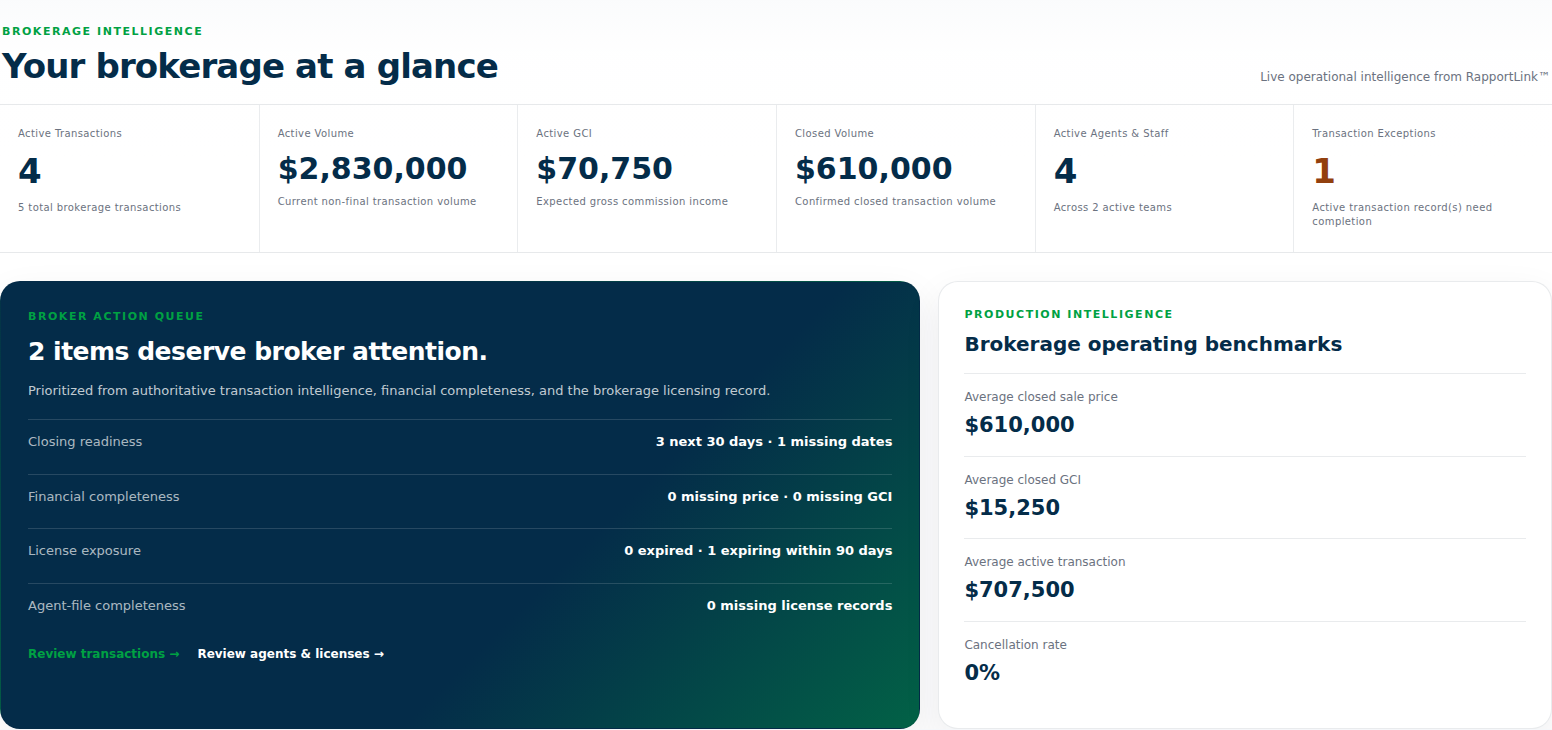
RapportLink gives brokers a workspace for transaction oversight, agents and teams, Broker Checklists, review decisions, commission allocations, and reporting. See which deal needs attention, open its supporting details, and record the work your brokerage has reviewed.
Open a brokerage transaction and check its documents and Broker Checklist.
Resolve outstanding items and save the broker review decision.
Review commission allocations and examine the applicable final reports.
Find the transaction that needs your attention
Start with the brokerage overview and transaction list. Use search and sorting to find deals by the information you need, such as agent, closing date, price, gross commission, or address. Open the transaction for its supporting documents, dates, checklist, and activity. This gives a broker a route from the overall pipeline to a particular file, rather than relying on a summary number to explain whether the underlying work is ready.
Work through the Broker Checklist
The Broker Checklist is separate from the agent workflow checklist. Review the available evidence and record the broker’s own checklist decisions. The workspace distinguishes AI-supported information from explicit broker decisions, so you can see the source of a confirmation. Use the underlying documents and your brokerage’s review requirements when deciding whether an item is complete. A checklist is a tool for organizing review; professional responsibility remains with the broker.
Save a review decision and the reason behind it
Broker Review provides Not reviewed, In review, Needs attention, and Approved statuses, with broker-only notes. A broker can begin a review, document an outstanding question, mark the file as needing attention, and approve it after the issue is resolved. Saved review activity records the decision and who made it. The review status is distinct from the transaction’s deal status, so approving a review does not itself change a pending transaction into a closed one.
Review commission allocations before approval
Open the commission workspace to examine gross commission and the recipient allocations. Check the amounts against the applicable agent, team, and brokerage arrangement before approving the statement. For illustration, a $20,000 gross commission with a 30% brokerage share allocates $6,000 to the brokerage and $14,000 to the agent before other applicable allocations or deductions. This is an example, not a required split. Commission approval records a decision; it does not itself disburse funds.
Manage agents, teams, and finalized reporting
Agents & Teams and the invitation workflow help organize the people in your brokerage workspace. Authorized broker users can also examine reports such as the Final Commission Register and Recipient Allocation Summary. Use the report’s selected period and scope to understand the finalized activity it includes. Expected commissions on open deals and approved final commissions answer different business questions. Broker access depends on the appropriate account role and brokerage setup.
Example: complete the broker’s review of a closing
Open the transaction, inspect the supporting documents, and work through the Broker Checklist. If something is missing, save Needs attention with a broker-only note explaining the issue. After reviewing the resolved item, save the appropriate checklist decisions and Approved review status. Separately check and approve the commission statement, then use the applicable final commission reports. This illustrates a completed review process without treating the closing, broker approval, commission approval, and payment as the same event.
Common questions
What does RapportLink include for a real estate broker?
The broker workspace includes transaction oversight, agents and teams, invitations, a Broker Checklist, review decisions and notes, commission review, and reports. Access requires the appropriate brokerage role and setup.
Is the Broker Checklist different from the agent checklist?
Yes. The Broker Checklist supports brokerage review separately from the agent workflow checklist. Explicit broker decisions and AI-supported information are identified in the workspace.
Can a broker flag a file for further attention?
Yes. Save the Needs attention review status and use broker-only notes to record the question or follow-up. The review can be updated after the issue is resolved.
Does an Approved broker review mean the transaction is closed?
No. Broker review status is separate from the transaction’s deal status. Commission approval is also a distinct process.
Does RapportLink require a particular brokerage commission split?
The 30% brokerage share shown here is an illustrative calculation, not a required arrangement. Review the commission statement using the actual agreement and applicable allocations.
Which final commission reports are available?
Reports include the Final Commission Register and Recipient Allocation Summary. Check the selected period and report scope when reviewing finalized commission activity.
Does approving a commission pay the agent?
No. Commission review and reporting do not themselves transfer money. Confirm disbursement separately through the applicable payment or accounting process.
See how RapportLink fits your business.
Explore the product and the current account options.