
AI real estate marketing, built around your brand.
Turn a listing, open house, closing, or client follow-up into marketing you can review and use. RapportLink’s Campaign Studio brings together your idea, property details, photography, audience, and brand, with formats for email, social, and print.
Choose the occasion, format, and contact audience.
Build and edit creative with your details, photos, and brand.
Review delivery setup, plan follow-up, and examine available results.
Start with the occasion and the audience
Choose what you want the campaign to accomplish: introduce a listing, invite people to an open house, announce a price change, share a closing, or reconnect with past clients. Provide the facts and the audience the message needs. Contacts and tags help you organize recipients around that purpose. AI assistance develops the creative from your starting point, and you review the wording and details before using the result.
Create email, social, and print pieces
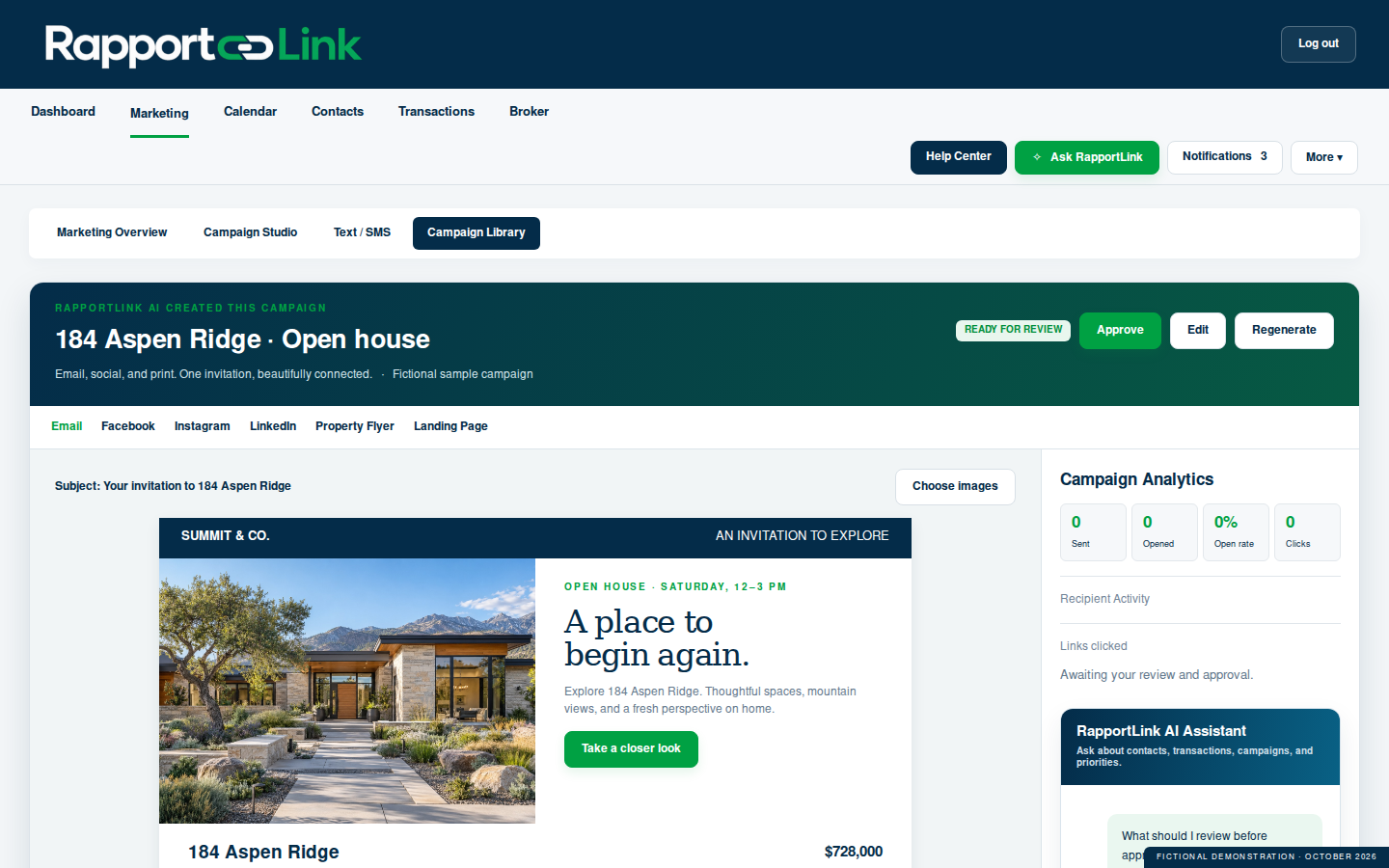
Campaign Studio supports email creative, social copy and graphics, postcards, flyers, brochures, letters, and landing-page creative. Text and call-script formats support additional outreach workflows. You can choose a format for the job instead of using one piece everywhere. An open house might call for an email invitation, a social graphic, and a printed handout, each with the same verified property details and your branding. Printing, postage, and external publishing are separate from creating the piece.
Use your photography, identity, and edits
Bring your property photography and brand into the creative process. Your profile and branding setup provide the agent and brokerage identity used in the marketing workflow. Review the logo, contact information, property facts, images, and required disclosures in the finished piece. Edit the message so it sounds like you and fits the audience. AI-generated wording is a starting point for your review, particularly when a piece includes property claims or transaction details.
Plan follow-up in Drip Campaign
Use Drip Campaign to organize a sequence with Email, Text, Call, and Task steps. For a seller inquiry, an illustrative sequence could begin with an introduction email, followed by a call and a task to prepare for a listing conversation. Each step gives the next follow-up a place in the plan. Review the sequence, timing, recipients, and sending setup before activation. Call and Task steps organize work for a person to complete; they are not promises of an automatically completed conversation.
Review recorded campaign activity
Marketing reporting helps you examine the activity available for your campaigns and choose where to follow up. Review the report’s scope and date range before interpreting the numbers. An email provider accepting a message is different from a confirmed inbox delivery, and recorded opens or clicks can include automated scanners. Use the available evidence to inform your next action. Creating a social or print piece alone does not establish that the platform can measure its eventual engagement or revenue.
Example: build an open-house campaign
Start with the property’s verified features, approved photos, and open-house date and time. Create an email invitation for the intended contact group, then adapt the information into a social graphic and flyer. Check the branding, property details, and event time in each piece before sending, publishing, or printing. After the event, prepare relevant follow-up and record the next calls or tasks. This illustrates how multiple formats can support one campaign without assuming every channel publishes or tracks results automatically.
Common questions
What can RapportLink create for real estate marketing?
Supported creative formats include email, text, social copy and graphics, postcards, flyers, brochures, letters, landing-page creative, and call scripts. Choose the format in the relevant marketing workflow.
Can I edit AI-generated marketing before using it?
Yes. Review and edit the creative, check the facts and images, and verify the intended recipients before using it.
Can I use my own logo and property photos?
Yes. Your profile, branding setup, and photography support your marketing identity. Review each finished piece to confirm that the correct agent and brokerage details appear.
Does RapportLink support drip campaigns?
Yes. Drip Campaign provides Email, Text, Call, and Task steps to organize follow-up. Sending availability depends on the account and channel setup; calls and tasks still need the responsible person’s action.
Does making a postcard also print and mail it?
No. RapportLink creates the marketing piece. Printing, postage, and mailing arrangements are separate.
Can I target a group of contacts?
Yes. Contact groups and tags help organize an audience. Check the final recipient selection and communication permissions before sending.
See how RapportLink fits your business.
Explore the product and the current account options.